BPOINT Payment - Important Information
Before you pay, you'll need the payment reference number from your notice.
Your payment reference number is printed on your rates or water notice, in the payment slip at the bottom of the notice, alongside the BPOINT and BPAY logos. It is a seven-digit number.
Leeton Shire issues a separate reference number for rates and for water, so please make sure it matches the payment you're making:
Rates - your reference number begins with 10 (for example, 10XXXXX)
Water - your reference number begins with 60 (for example, 60XXXXX)
Using the wrong number may delay your payment being credited correctly.
A few tips
Enter the reference number exactly as shown, with no spaces.
Paying both rates and water? Complete each payment separately, using its own reference number.
Can't find your notice or reference number?
Contact Council on 02 6953 0911 or council@leeton.nsw.gov.au and we'll help.
Surcharges may apply
Surcharge Details
What is CVN
Where can I find my Card Verification Number?
|
|
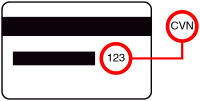
3 digits located on the back of your card |
|
|
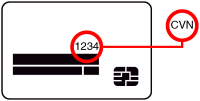
4 digits located on the front of your card |
Review Details
Processing payment
Please complete the CAPTCHA.
Authentication Required
Processing authentication result...
Direct Debit Request
Sign up is completed and the first payment is processed.
Thank you for signing up to this payment plan. Below is the receipt for the first transaction and the detail for the payment plan sign up.
| You have paid | |
| Amount paid today Amount to pay today | |
| Total amount today (inc. surcharge) | |
| Total amount today | |
| Total amount today | |
| Card number | |
| Expiry date | |
| Cardholder name | |
| Payment method |  |
| Payment method | |
| Payment method | |
| BSB number | |
| Account number | |
| Account name |
Detail for the payment plan sign up
| Total amount | |
| Payment plan option | |
| Next payment | |
| Next payment date | |
| No. of remaining payments | |
| Remaining amount to pay |