2. Check the Biller Code
Make sure it shows:
1279009 - LSC Debtor Payment
(This should already be selected on the page.)
3. Enter Your Debtor Number
- Find your Debtor Number on your invoice
- Type it into the Debtor Number box
- Example would be 123.06 (eg. include the .06 or .01)
4. Enter Your Invoice Number
- Find your Invoice Number on your invoice
- Type it into the Invoice No box
5. Click NEXT
- Click the orange NEXT button
- Follow the prompts to complete your payment
Loading...
Surcharges may apply
Surcharge Details
What is CVN
Where can I find my Card Verification Number?
|
|
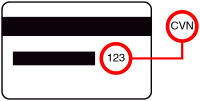
3 digits located on the back of your card |
|
|
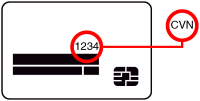
4 digits located on the front of your card |
Review Details
Processing payment
Please complete the CAPTCHA.
Authentication Required
Processing authentication result...
Direct Debit Request
Sign up is completed and the first payment is processed.
Thank you for signing up to this payment plan. Below is the receipt for the first transaction and the detail for the payment plan sign up.
| You have paid | |
| Amount paid today Amount to pay today | |
| Total amount today (inc. surcharge) | |
| Total amount today | |
| Total amount today | |
| Card number | |
| Expiry date | |
| Cardholder name | |
| Payment method |  |
| Payment method | |
| Payment method | |
| BSB number | |
| Account number | |
| Account name |
Detail for the payment plan sign up
| Total amount | |
| Payment plan option | |
| Next payment | |
| Next payment date | |
| No. of remaining payments | |
| Remaining amount to pay |